Folder Selection
Replace this introduction with a short summary of the page. The header table above is required on every document — fill in the Value column. It is detected automatically and re-displayed in a consistent panel at the top of the published page, so you do not need to format it yourself.
Write one topic per document. Each document becomes one web page that can be updated on its own (by a person or an AI agent) without affecting other pages.
Document Sources for Tag Extraction
For Tag Extraction, X4D can be used in two different scenarios:
-
Live Working Documents
-
Documents Issued into a Document Management System (DMS)
Live Working Documents
During project execution, engineering documents are typically maintained within working folders used by the various project participants. These documents may reside on local drives, network drives, cloud-synchronized folders, or project-specific file repositories.
Examples include:
Owner Operators maintain documents within their internal network folders.
EPC companies maintain project documents within their engineering working folders.
Contractors maintain discipline-specific document repositories.
Vendors maintaining equipment packages and vendor document folders.
As a result, a single project may contain documents distributed across multiple locations and organizations, each using different folder structures and document management practices.
Documents Issued into DMS
As documents progress through the project lifecycle, they are often formally issued and transferred into a Document Management System (DMS).
Examples include:
OpenText
Aconex
SharePoint
ProjectWise
Meridian
Proprietary client DMS systems
Documents stored within a DMS typically represent controlled project deliverables and may include revisions, approval status, metadata, and document transmittal information.
X4D Support
X4D supports both scenarios:
Tag Extraction directly from live working documents located in project folders and repositories.
Tag Extraction from documents downloaded or synchronized from a Document Management System (DMS).
This flexibility allows project teams to perform Tag Extraction during active engineering execution or after documents have been formally issued and controlled within a DMS environment.
Performance Optimization
For Tag Extraction, the files to be processed by X4D are typically stored across multiple project folders and subfolders. These folders may represent active project working directories or temporary repositories synchronized from a Document Management System (DMS).
In large projects, the number of folders and documents can become substantial, especially when processing engineering deliverables such as P&IDs, Datasheets, Loop Drawings, Specifications, Vendor Documents, Reports, and Electrical Drawings.
To improve performance when loading, browsing, filtering, and processing these documents, X4D provides document repository filtering and management capabilities that help users reduce the number of files being processed and improve navigation through large document collections.
The following sections describe the available repository filtering options and recommended practices for achieving optimal performance when working with large document repositories.
Work Location:
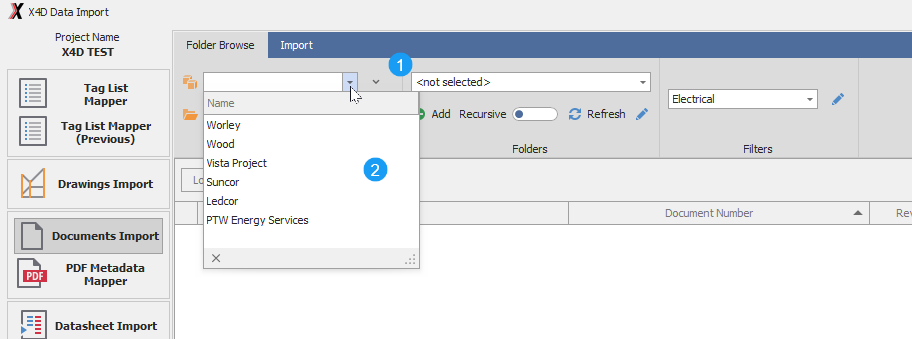
- 1 Select the Work Location from where user is working
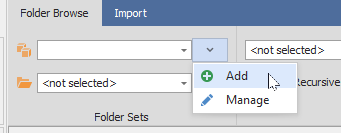
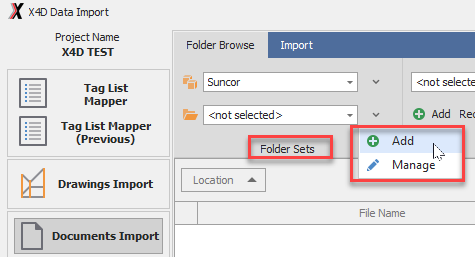
- 1 On the side dropdown, select Add or Manage
- 2 Users can add their own Locations as required
- 3 The Work Locations are only a way to groups folders and have no impact on how Project documents are managed
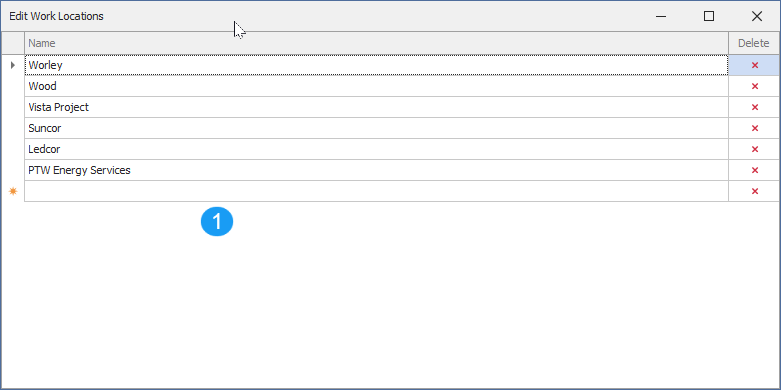
- 1 Work Manage Location form can be used to add new, modify or delete Locations
- 2 Hit Cross Button to remove any location.